How to Use the MCP Service
MCP (Model Context Protocol) is an open standard that enables AI assistants to interact with external tools and services securely. GNS3 Server provides a standard MCP interface over SSE (Server-Sent Events) transport, allowing AI assistants like Claude Code to interact with GNS3.
With the MCP service, you can use natural language commands to manage GNS3 projects, nodes, links, templates, and compute nodes without manually using the GNS3 GUI/Web UI.
Beyond using ready-made clients, you can also build your own AI Agent based on MCP, or integrate it into existing AI workflows to enable automated testing and verification.
Prerequisites
- GNS3 server is running
- You have a GNS3 user account (default username/password:
admin/admin)
Endpoints
| Path | Method | Description |
|---|---|---|
/v3/mcp/ | GET | MCP service metadata |
/v3/mcp/transport/sse | GET | SSE stream (MCP connection entry point) |
/v3/mcp/transport/messages/ | POST | JSON-RPC messages |
Authentication
The MCP service supports two credential types: JWT Token (24-hour expiry) or API Key (permanent, revocable).
Create an API Key (Recommended)
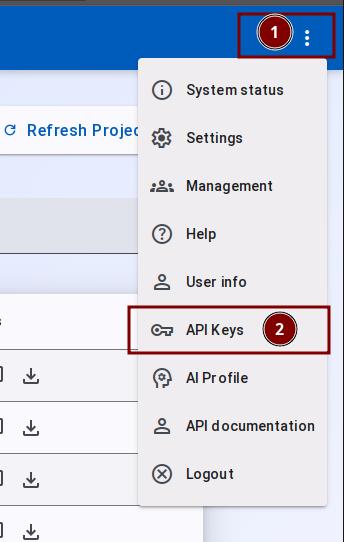
- After logging into the server, click the three dots button on the right side, then select the API Key option.
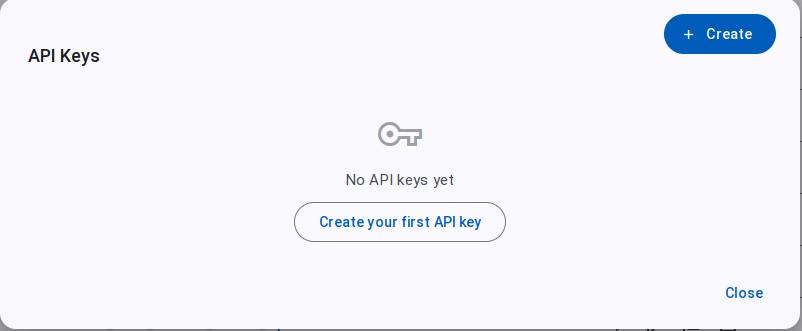
- In the API Keys dialog, click Create your first API key.
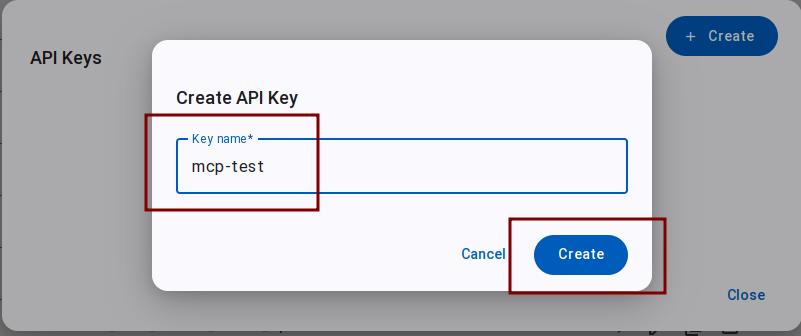
- Enter a name for the API Key and click Create.
- Once created, the dialog displays the key. Copy and save it now.
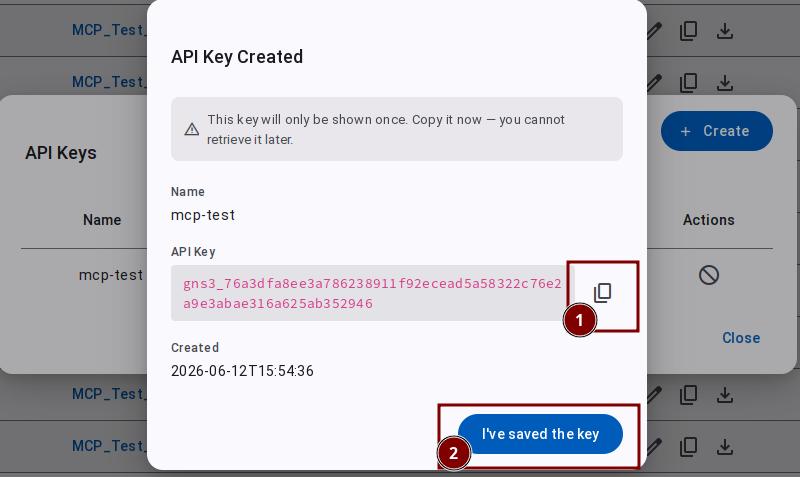
This API Key is only shown once. After closing the dialog, it cannot be displayed again. Save it immediately.
- The key appears in the list.
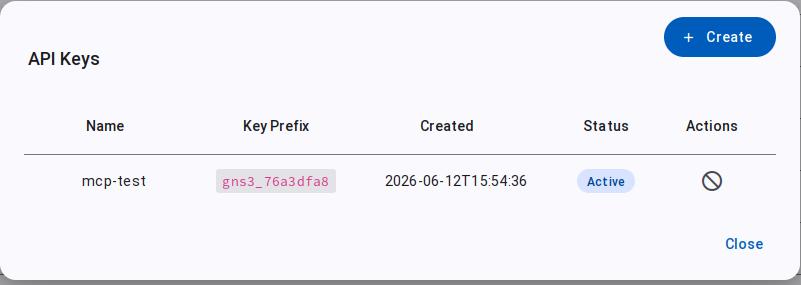
- In the Actions column, click Revoke to revoke a key.
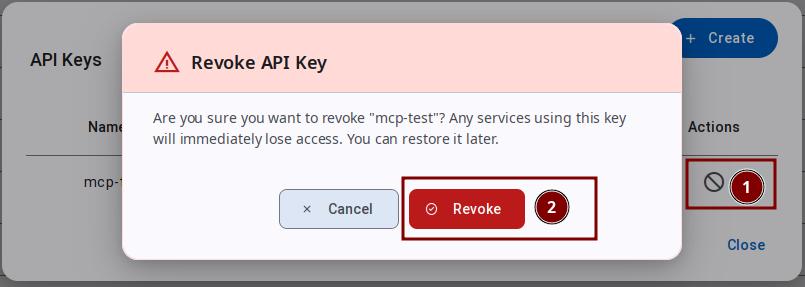
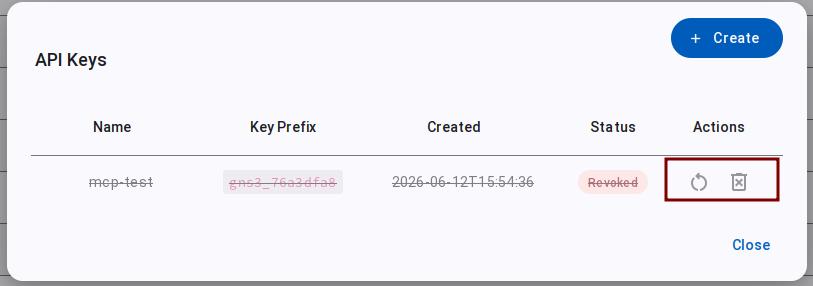
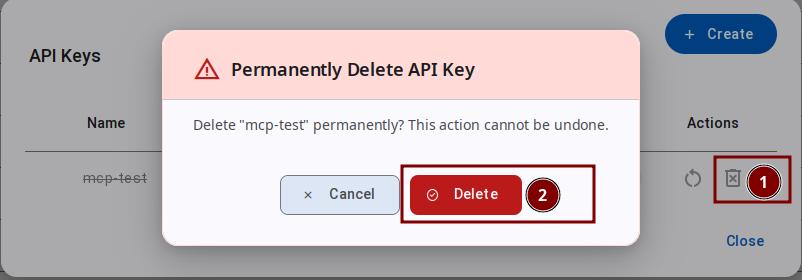
- After revocation, you can click Restore or Delete.
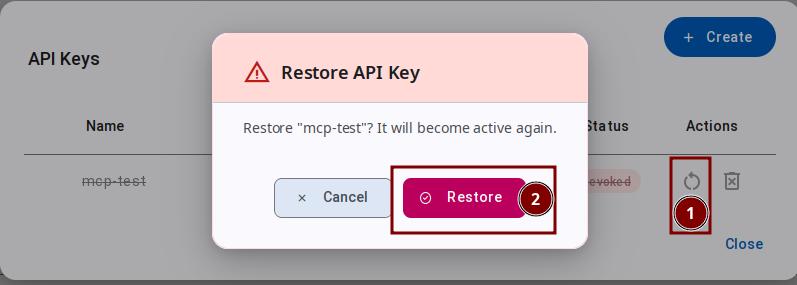
- Click Restore to restore the key
- Click Delete to permanently delete
Quick Start
Using with Claude Code
# Add MCP server
claude mcp add --transport sse My_GNS3_Server \
  http://localhost:3080/v3/mcp/transport/sse \
  -H "Authorization: Bearer $API_KEY"
Parameter explanation:
--transport sse— Use SSE (Server-Sent Events) transport, the standard MCP transport protocol that supports remote connectionsMy_GNS3_Server— A custom name for the MCP server, can be any name, used to identify this server in Claude Codehttp://localhost:3080/v3/mcp/transport/sse— The GNS3 server MCP SSE endpoint URL,localhostis the GNS3 server address,3080is the default port-H "Authorization: Bearer $API_KEY"— The authentication header carrying the API Key, replace$API_KEYwith the API Key value obtained in the previous step
Once configured, you can manage GNS3 using natural language in Claude Code, for example:
- "List all GNS3 projects"
- "Create a new project named 'OSPF Lab'"
- "Add a Cisco router to the project"
- "Start the node and check its status"
Available Tools
The MCP service provides 82 tools across 12 categories:
Project (15)
| Tool | Description | Required Parameters |
|---|---|---|
project_list | List all projects | none |
project_get | Get project details | project_id |
project_create | Create a project | name |
project_delete | Delete a project | project_id |
project_open | Open a closed project | project_id |
project_close | Close an open project | project_id |
project_stats | Get project statistics | project_id |
project_update | Update project properties | project_id |
project_duplicate | Duplicate a project | project_id, name |
project_readme_get | Get project README content | project_id |
project_readme_update | Update project README | project_id, content_markdown |
project_lock | Lock project (prevent edits) | project_id |
project_unlock | Unlock project | project_id |
project_load | Load project from path | path |
project_locked | Check if project is locked | project_id |
After calling project_unlock, the project status query may still show locked=true momentarily due to status sync delay.
Node (22)
| Tool | Description | Required Parameters |
|---|---|---|
node_list | List all nodes in a project (fields to filter columns, e.g. ["name","status"]) | project_id |
node_get | Get node details (fields to filter columns) | project_id, node_id |
node_create | Create node(s) — single via template_id or batch via nodes array. In batch mode the top-level template_id is the default and each entry can set name; coordinates use a canvas-center origin (X right-positive, Y down-positive) | project_id, template_id |
node_delete | Delete a node | project_id, node_id |
node_update | Update node properties | project_id, node_id |
node_start | Start node(s) — node_id or node_ids array | project_id, node_id |
node_stop | Stop node(s) — node_id or node_ids array | project_id, node_id |
node_reload | Reload node(s) — node_id or node_ids array | project_id, node_id |
node_suspend | Suspend node(s) — node_id or node_ids array | project_id, node_id |
node_console | Get WebSocket console URL | project_id, node_id |
node_file_list | List files in node directory | project_id, node_id |
node_file_get | Read a file (with offset/limit) | project_id, node_id, path |
node_file_write | Write a file | project_id, node_id, path, content |
node_file_delete | Delete a file | project_id, node_id, path |
node_start_all | Start all nodes in a project | project_id |
node_stop_all | Stop all nodes in a project | project_id |
node_suspend_all | Suspend all nodes in a project | project_id |
node_reload_all | Reload all nodes in a project | project_id |
node_duplicate | Duplicate a node | project_id, node_id |
node_isolate | Isolate a node (suspend its links) | project_id, node_id |
node_unisolate | Un-isolate a node (resume links) | project_id, node_id |
node_links | List links connected to a node | project_id, node_id |
The WebSocket URL returned by node_console requires the websocat tool to connect. Make sure it is installed on the system running Claude Code. Install via: cargo install websocat (requires Rust toolchain) or download a prebuilt binary from GitHub Releases.
The node_console tool returns a WebSocket URL for connecting to a node's console. The URL includes a short-lived JWT (10 minutes) — reconnect if it expires. This endpoint is protocol-agnostic — it works for telnet, ssh, and vnc console types alike. The WebSocket simply proxies raw byte streams between the client and the compute node; protocol negotiation (e.g. SSH key exchange) happens on the compute side.
node_suspend behavior varies by node type:
- Docker / Dynamips / QEMU: Full suspend supported — status changes to
suspended - VPCS / IOU: Suspend not supported — returns 405 (swallowed by controller, status remains
started) - Cloud / NAT / Ethernet switch: No independent process to suspend — only status is marked, no actual effect Check node type before using suspend and verify via the status field.
Link (9)
| Tool | Description | Required Parameters |
|---|---|---|
link_list | List all links in a project | project_id |
link_get | Get link details | project_id, link_id |
link_create | Create link(s) — single via nodes or batch via links array. Nodes support a compact format [id, ad, pt, id, ad, pt] (i.e. node_id, adapter_number, port_number) | project_id, nodes |
link_delete | Delete link(s) — link_id or link_ids array | project_id, link_id/link_ids |
link_update | Update link (suspend, filters) | project_id, link_id |
link_reset | Reset link(s) — link_id or link_ids array | project_id, link_id/link_ids |
link_capture_start | Start capture(s) — link_id or link_ids array | project_id, link_id/link_ids |
link_capture_stop | Stop capture(s) — link_id or link_ids array | project_id, link_id/link_ids |
link_capture_download | Get PCAP download URL(s) — link_id or link_ids array | project_id, link_id/link_ids |
link_reset does not clear existing filter settings — only the UDP connection is torn down and rebuilt. Node connections and filters are preserved.
Template (5)
| Tool | Description | Required Parameters |
|---|---|---|
template_list | List all templates (fields to filter columns) | none |
template_get | Get template details | template_id or name |
template_create | Create a template (Docker needs image) | name, template_type |
template_update | Update a template | template_id or name |
template_delete | Delete a template | template_id or name |
Compute (3)
| Tool | Description | Required Parameters |
|---|---|---|
compute_list | List registered remote computes | none |
compute_get | Get compute details | compute_id |
compute_images | List emulator images on a compute | compute_id, emulator |
compute_images is designed for remote compute nodes. For images on the local compute, use image_list instead.
Snapshot (4)
| Tool | Description | Required Parameters |
|---|---|---|
snapshot_list | List snapshots | project_id |
snapshot_create | Create a snapshot | project_id, name |
snapshot_delete | Delete a snapshot | project_id, snapshot_id |
snapshot_restore | Restore a snapshot | project_id, snapshot_id |
Drawing (5)
| Tool | Description | Required Parameters |
|---|---|---|
drawing_list | List drawings on canvas | project_id |
drawing_get | Get drawing details | project_id, drawing_id |
drawing_create | Create drawing (SVG label/shape/image) | project_id, svg |
drawing_update | Update drawing (position, rotation, SVG) | project_id, drawing_id |
drawing_delete | Delete a drawing | project_id, drawing_id |
GNS3's SVG renderer handles some SVG features differently from the standard:
<rect>must have a valid color fill value (e.g.fill="#FF0000"), otherwise it won't display.fill="none"is not supported.<ellipse>does not have this limitation.<path>Z (close) command may not be properly supported. Keep these differences in mind when creating custom drawing SVGs.
Symbol (6)
| Tool | Description | Required Parameters |
|---|---|---|
symbol_list | List all symbols | none |
symbol_get | Get symbol download URL | symbol_id |
symbol_dimensions | Get symbol dimensions | symbol_id |
symbol_defaults | Get default symbol mapping | none |
symbol_upload | Upload a custom symbol (SVG content) | symbol_id, svg_content |
symbol_delete | Delete a custom symbol | symbol_id |
Appliance (3)
| Tool | Description | Required Parameters |
|---|---|---|
appliance_list | List appliances from template library (fields to filter, e.g. ["name","category"]) | none |
appliance_get | Get appliance details | appliance_id |
appliance_install | Create template from appliance | appliance_id |
Image (5)
| Tool | Description | Required Parameters |
|---|---|---|
image_list | List all images | none |
image_get | Get image details | image_id |
image_delete | Delete an image | image_id |
image_prune | Remove images not referenced by any template | none |
image_install | Auto-create templates from uploaded images | none |
Before using image_install, image files must be manually placed in the ~/GNS3/images/ directory on the server. The tool does not download images automatically — it only creates templates from existing image files by checksum matching.
Server (2)
| Tool | Description | Required Parameters |
|---|---|---|
server_version | Get GNS3 server version | none |
server_statistics | Get server statistics (computes, projects, nodes) | none |
Device Config (3)
| Tool | Description | Required Parameters |
|---|---|---|
device_config_send | Push config commands to devices via console (Nornir + Netmiko). Supports Jinja2 template + vars | project_id, device_name, config_commands |
device_show_run | Run read-only show commands on devices. Supports Jinja2 template + vars | project_id, device_name, commands |
vpcs_config_set | Configure VPCS devices (IP, gateway, etc.) | project_id, device_name, ip, netmask, gateway |
You must start the node before you can configure the device. Device type is auto-detected from the node's device_type:<type> tag.
Device Config Workflow
Jinja2 Template Mode
device_config_send and device_show_run both support an optional template parameter. When provided, each device's vars dict is rendered against the template to produce commands. Entries with the same device_name are merged into a single session.
# Direct commands (single/batch)
device_config_send(project_id, device_configs=[
    {"device_name": "R1", "config_commands": ["int lo0", "ip add 1.1.1.1 255.255.255.255"]},
])

# Jinja2 template (reduces token usage for batch)
device_config_send(project_id,
    template="interface lo{{ n }}\nip address {{ ip }} 255.255.255.255",
    device_configs=[
        {"device_name": "R1", "vars": {"n": 0, "ip": "1.1.1.1"}},
        {"device_name": "R2", "vars": {"n": 0, "ip": "2.2.2.2"}},
    ])
Best Practices
- Prefer template over direct commands for batch — when ≥2 nodes share the same config structure with different values, use
template+varsinstead of writingconfig_commandsper node. This reduces token usage and transcription errors. - Don't rely on
status: successalone — it only means the commands entered config mode. IOS errors (% Invalid input,% overlaps,% Incomplete command) appear inside theoutputtext — always scan for%lines. - Pilot before full rollout — test template + vars on 1–2 devices first to verify rendering and syntax, then expand to all nodes.
Config Backup via File Operations
IOU and Dynamips nodes save the startup config as a plain text file (startup-config.cfg) in the node directory after write memory. Back up and restore it via node_file_get / node_file_write.
# Save config on the device
device_show_run(project_id, device_configs=[
    {"device_name": "R1", "commands": ["write memory"]},
])
# Backup
config = node_file_get(project_id, node_id, "startup-config.cfg")
# Restore if config breaks
node_file_write(project_id, node_id, "startup-config.cfg", config)
node_reload(project_id, node_id)
Test Report
Full 82-tool test results are available in the gns3-api-mcp-test repository:
- English Test Report — 13-stage coverage across all tools
Demo Video
Architecture Overview
The sequence diagram below illustrates how a client connects, authenticates, discovers tools, and invokes them:
Transport Security Configuration
By default, the GNS3 Server MCP service allows connections from all hosts, consistent with GNS3 server's policy of listening on 0.0.0.0 (all network interfaces).
To restrict access sources, enable DNS rebinding protection in gns3_server.conf. mcp_allowed_hosts should be set to the address clients use to reach the GNS3 server, not the client's own address:
[Server]

; Enable MCP transport security (default False)
mcp_enable_dns_rebinding_protection = True

; GNS3 server addresses that clients are allowed to connect to ("host:port" format)
; e.g. if GNS3 server IP is 192.168.1.3, add 192.168.1.3:*
mcp_allowed_hosts = 127.0.0.1:*,localhost:*,192.168.1.3:*

; Allowed origin list (CORS Origin)
mcp_allowed_origins = http://127.0.0.1:*,http://localhost:*,http://192.168.1.3:*
With the default configuration, all hosts can connect — suitable for most scenarios. Only enable protection when you need to strictly restrict access sources.
Internal Implementation
The MCP service is built on FastMCP (Anthropic MCP SDK) and mounted as a Starlette sub-application under /v3/mcp/transport; tool handlers call GNS3's own REST API via Gns3Connector, keeping the MCP layer decoupled from business logic. JWT tokens are validated by GNS3's existing auth_service and propagated to asyncio.to_thread (Python ≥ 3.9) worker threads via a contextvars.ContextVar.
The WebSocket URL returned by node_console is constructed by the server's _server_url(), whose host resolution works as follows (affects the reachable address for remote connections):
Server.host value | Resolved host in URL |
|---|---|
Specific IP or hostname (e.g. 192.168.1.3) | Used as-is |
0.0.0.0 (IPv4 any, default) | Detected via default route interface IP |
:: (IPv6 any) | Detected via default route interface IP |
| Detection failure | Fallback to 127.0.0.1 |
When Server.host is 0.0.0.0, the server discovers the default route interface IP via a UDP socket connect to 8.8.8.8:80 (no data is actually sent), ensuring the returned address is reachable:
websocat ws://192.168.1.3:3080/v3/projects/{project_id}/nodes/{node_id}/console/ws?token=<jwt>
Frequently Asked Questions
What's the difference between MCP and GNS3 Copilot?
- GNS3 Copilot (AI Assistant): Built-in AI feature within the GNS3 GUI that provides topology management, fault diagnosis, and automated configuration through LLMs
- MCP Service: Provides a standardized MCP protocol interface for external AI clients (like Claude Code) to interact with GNS3 functionality in a unified way
They can be used together: MCP is for tool-calling scenarios, while the AI Assistant is for in-GUI interactive usage.
Is remote connection supported?
Yes. Replace localhost with the actual IP address or domain name of your GNS3 server. Ensure network reachability and that the server port (default 3080, GNS3 VM default 80) is open.
Feature Contributor
The MCP service feature was developed and contributed by YueGuobin.
License
This document is licensed under CC BY-NC-ND 4.0 (Attribution-NonCommercial-NoDerivatives). Author: YueGuobin